


I have a love for words and a knack for SEO – and as a mama, I know just how challenging it can be to run a business while raising a family. This blog is just one of the many resources you’ll find here that’ll help you boost your online visibility without sacrificing your sanity.
Thanks for being here (and I hope you’ll stick around).
Mckayla
categories
blogging
seo
Business
free seo checklist

get your checklist
explore
case studies
to the shop
work with us
follow us on instagram
share

Get access to six simple things you can do in 15-minutes or less to improve your SEO and get your website (and content) to show up in search.
In the past month alone I’ve been faced with two very last-minute Squarespace to Shopify migrations—and while I also love that these business owners are moving to platforms that better suit their needs, it’s leaves a lot (and I mean A LOT) to be talked about in the world of SEO and user experience (aka how your customers interact with your shop).
With an established site, you’re fighting to keep your SEO (search engine optimization, your current rankings). With a new site, you’re fighting not to get penalized—and that your ‘growth’ period on Squarespace won’t lead to a handful of broken links that’ll bite you in the butt later.
Before I get too into it (and potentially lose the plot), there are two main issues that come from migrating your Squarespace site to Shopify →
- The URL structure is completely different (the links to your products, pages, and posts) and there’s not much you can do about it. Meaning 99% of your links will break in the migration without proper redirects.
- If you have any content, it’s a pain in the butt to transfer over. In fact, if you have only 20-30 posts, it’s quicker to copy-and-paste your blog posts over MANUALLY if that says anything about how extra they are.
And, no, those aren’t the only issues you can face during a migration, but they’re definitely the most common (and the most time-consuming).
**Also, this isn’t a note convincing you NOT to migrate over to Shopify, I actually appreciate Shopify’s SEO capabilities (more so than Squarespace if we’re being 100% honest), but you should migrate carefully to not lose a customer base you already have (or stunt the growth of the one you’re building).
Squarespace SEO vs. Shopify SEO: What’s the Difference?
Most platforms offer similar SEO capabilities, it’s just the ease of use AND the ability to customize that changes—Squarespace and Shopify really aren’t too different (in that sense).
Squarespace shines in their ease of use—it’s much more user-friendly to beginner shop owners to start and build. You have your basic SEO set-up capabilities (SEO page titles, meta descriptions, alt image descriptions, header code, etc.) and even built-in schema.
What you don’t have, however, is the ability to edit that schema—nor easily modify ANY code. On the bright side, Squarespace’s blog capabilities are somewhat better (and still more user-friendly) than Shopify’s.
Shopify shines in their advanced capabilities. They’re who you want to work with if your goal is to get your products and site Google’d long term. While they lack the ease of use that comes with Squarespace, the platform offers more flexibility (and robust built-in) with their SEO features.
However, blogging can be a pain. The same with designing a site thanks to liquid (but they make up for it with easy-to-use themes!).
What to Know Before Migrating From Squarespace to Shopify
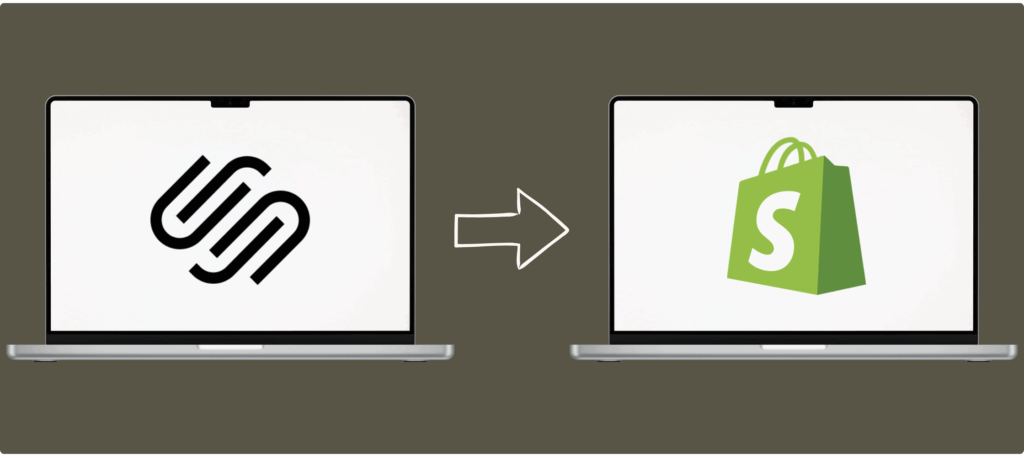
Whatever the reason, you’ve decided (or are thinking about) making the swap from Squarespace to Shopify. You’re aware of some of the risks, but let’s break down more of what they are and how you can mitigate them—because you 100% can migrate and still save your SEO.
Here’s what you need to know:
You’re Going to Break Almost Every Link—But it IS Fixable
Did you know that products on Squarespace have a URL structure of ‘yourwebsite.com/shop/p/product’ and that the ‘/p/’ can’t be changed? In Shopify the default is ‘yourwebsite.com/products/product-name’ and the ‘/products/’ can’t be changed.
And there’s something very similar when it comes to the default blog post URLs.
Yes, every link on your website is pretty much going to break. There’s not really much you can do about it without playing with code (and I personally don’t recommend it—you’ll end up with MORE issues most times).
What you can do, however, is create 301 redirects for every current link on your website to ensure it points at the correct new URL.
Both Changing and Leaving Everything the Same Can Mess Up Your SEO
When it comes to changing things vs. trying to leave things as close to what they used to be (think metas, copy on page, product descriptions, images, the works), I’m going to give a very lawyer-like answer: it depends.
You’re playing a very interesting game when it comes to a Squarespace to Shopify migration—you’re both trying to maintain any SEO you have, but also recognizing that if you have some pages that need a little (or really, a lot) of TLC, search engines are about to put it under a magnifying glass.
For some pages, you’ll be trying your hardest not to change anything and just leaning on the 301 redirect to do it’s job. For others, you’ll be updating the page, post, or product to match current best practices (or fix what you originally skipped) so you don’t take a hit.
Think of it this way, Google doesn’t crawl (look) at your pages everyday. It can go months without re-crawling your pages while still letting it show up in search. During a migration, Google will naturally re-crawl your pages as it confirms the redirects are what they’re supposed to be.
In this crawl, something that was fine a year ago in your post might not live up to the ‘today’ standards—or someone swooped in and created a better, more optimized/user friendly version in the meantime and Google prefers it to yours.
Short Version → 301 redirects do NOT cause loss of PageRank when used appropriately. HOWEVER, Google will crawl your site more heavily after a migration—this is often where rankings are lost.
Feel free to read it straight from the OG source (Google) here.
Your Blog is One of the Biggest Risks—And Biggest Time-Consumers During a Migration
Honestly, the blog migration from Squarespace to Shopify is one of the most annoying (actually, nearly anywhere to Shopify, but I digress). See, Squarespace can export all your blog content as an .xml file—the usual for a blog, it’s what WordPress uses.
And if you were migrating to a WordPress site, you could just import, and double check your work (assuming no updates need to be made).
But, since you’re migrating to Shopify, you have to change the file type. Shopify works off of CSV files. And while you can work with a file re-formatter to change the file type for you (AI can do this, too), you’ll have to clean it up before you can import it to Shopify.
And then you’ll still need to check every. single. post.
Don’t even get me started on the images.
If you have 20-30 blog posts, it’s easier and usually takes LESS time to copy and paste it manually from your Squarespace blog to your new Shopify blog.
psst… there’s also the issue of content not being up to SEO standards, old links from your Squarespace site that now have 301 redirects but should still be updated because of longer load times, and even structure that has to be checked and updated. And if you’ve done all your SEO for every post on your Squarespace site, and the page is ranking, you’ll need to bring it over AS IS to your Shopify site. Honestly, this deserves it’s own blog post lol.
Images Have to Be Migrated Pretty Manually, Too
Technically, your images can somewhat pull over from your XML turned CSV file, but you’re also going to need to re-upload the files into Shopify manually, anyways so the image URLs work in the first place–and that’s assuming they come over correctly.
Your best bet is to manually download them from Squarespace and re-upload them to Shopify. Yes, this is a lot of images in some cases…so you do have some options (and tips).
- For featured images, really determine if you need the old one or you can upload a more recent or relevant image.
- If the image is in post, determine how detrimental to the content the image is–is it required for the post to make sense, or is it just added for visual interest? If it’s necessary, migrate it–if it’s not, leave it be (aka don’t stress it).
- Matching images (and they’re meta information) is most important on pages RANKING as we want to reduce changes. Do with that information what you will.
You can bulk download using a third-party platform, but you’ll still be sorting through images (which in itself is time-consuming).
You Can Do Everything “Right” and Still See a Dip in Traffic
Anytime you change your URLs, you should expect to see a change in your rankings–usually temporary when done correctly and a Squarespace to Shopify migration is no different.
It can take anywhere from 1-4 weeks to ‘settle’ in your Google Search Console (and on other search engines, too) and get back to where you were–longer, even, for bigger websites.
This is why it’s also important to “pre-audit” your SEO before your migration–you need to see what you currently have before you start making changes (also, so you know where you CAN make changes) and monitor your post migration performance.
You Can Migrate Your Site From Squarespace to Shopify (You Just Need an SEO Strategy, Too)
If your Squarespace website launched two weeks ago and you’re noticing you don’t like the platform and need to swap–no worries! You don’t need to do all the things (you don’t have any SEO to ‘break’).
But if you have a solid consumer base, regular website traffic (even if it’s not necessarily a lot), or your website’s been around for awhile–get SEO migration help. The upfront cost will end up being a whole lot less than your lost sales (and SEO).
Can you DIY it? Yes. Is it easy? Depends on your site and what you, personally, need to do. And, if you’re curious what SEO support during your Squarespace to Shopify migration might look like, book a call–it’s what I’m here for!
Reader Etiquette
© - Content and images in this blog are copyright this blog unless stated otherwise. Feel free to repost or share images for non-commercial purpose, but please make sure to link back to this website and its original post.
℗ - We do not store any information about your visit to our website other than for analytics and optimization for content and reading experience through the use of cookies.
c/o - Our site does at times contain paid advertisements, sponsored content, and/or affiliate links.
You might want to check these out too while you're at it

categories
blogging
SEO
business

It's me, hi! Your SEO bestie.
get to know me
work with us
//
services
//
case studies
//
Mom of three, lover of all things blogging, and borderline obsessive coffee drinker — I also just happen to love making complicated things simple and accessible, especially when it comes to SEO. The blog is a collection of what I've learned from years of testing, trial and error, and working with amazing clients with impactful businesses (just like yours). Blogging and SEO doesn't have to be boring — and it definitely doesn't need to be difficult.
Mckayla
get your checklist
Want to improve your website SEO in one afternoon? This free resource offers 6 actionable steps you can take in 15 minutes or less to instantly improve your SEO.