Ranking for the “photographer near me” searches is the goal, but there’s no doubting the competition to get there—especially if the area that’s “near” you has more photographers than you can count on your hands. Luckily, you still have a chance. Just because an area is more than a little saturated in your industry, it doesn’t mean you can’t (or won’t) rank.
Or that your competitors are actually ranking for what you want to rank for.
Everything comes back to the basics of local SEO for photographers and what you—and your competitors—are doing (and not doing) to get your website seen locally in Google search.
Here are my top tips for improving your local SEO as a photographer and getting clients near you to find you:
What is Local SEO (And Why it Matters for Photographers)
Search engine optimization is “a set of practices designed to improve the appearance and positioning of web pages in organic search results.” Local SEO is the practice of focusing your SEO efforts toward ranking for a certain area – typically for brick-and-mortar or even freelance businesses that can only serve a specific location(s).
It’s essentially a marketing technique that allows your website to rank for specific queries in search engines—like Google. And, did you know, most users never go past the second page of Google search results to find the website they’ll click on? Yep, only 4% of Google users visit the second page of search results (Reputation 911).
Local SEO is what prevents clients from South Carolina finding you, hopping on a call, and getting disappointed when they discover you’re based in Ohio. It’s also what gets you to show up for the super specific local searches, like “wedding photographer in New York” or “maternity photographer in Boston.”
A great example of local SEO for photographers working to their benefit is a past client of mine, From the Daisies, who after focusing on SEO-optimizing her blog (portfolio), began ranking for keywords such as: chic wedding photographers santa barbara ca, botanical garden berkeley wedding, and lotusland in santa barbara. All keywords that are targeted to her audience and service, which is wedding photography in Santa Barbara, CA.
The TL;DR of why it matters? Because local SEO is your “foot in” for not relying on referrals, link-dropping your site in Facebook groups, and posting your portfolio 24/7 on Instagram and hopping the algorithm puts it in front of the right people. It’s what gets your website and business to show up even when you’re clocked out.
How to Improve Your Local SEO for Photographers: 5 Tips You Can Implement ASAP
There are two main reasons you’re here: either what you’re doing now to get clients isn’t sustainable or you need to expand how you’re finding clients (or rather, how new clients can find you). Luckily, you’re in an easier SEO industry—people know what photographers are.
Instead of awareness of what you are or what you do, it’s a fight to show up for the right people—and show up in front of your competitors. With this in mind, these tips were picked to help you make the biggest impact in the shortest time frame, and are what I recommend for every photographer, from boudoir and wedding to maternity and newborn:
Want to skip to a list? Download the free SEO checklist and get the six steps to improve your SEO in 15-minutes (or less) → Download your free checklist!
#1. Optimize Your Website’s Images (Yes, All of Them)
Luckily, this is something you an put on your favorite TV show and do in the background. It’s not a hard task by any means, but it is time consuming (especially for your portfolios). But optimizing the metadata of your images is not only good for SEO, but legally required for accessibility—which is also why it’s top of the list.

Alt. Image Description: bride and groom walking out of venue at night with a sparkler send off

Alt. Image Description: expecting mother with partner in casual jeans and white tops standing close together
You’re optimizing two main aspects:
- Your image name
- Your alt. image description
Both should describe and provide context to what is included in the image. For example, a bad image name would be IMG8723642.jpg and a good image name would be newborn-in-home-new-york.jpg.
As for a good alt. image description, it should be succinct, but descriptive. Remember, this is also a requirement for accessibility. I highly recommend following the recommendations set here.
#2. Pick a Central Location for Your Main Pages
And optimize your core pages for it. A good local SEO strategy needs an anchor location—think of this as either the umbrella location of where you like to work (for example, your state) or the hyper-local area you like to work within (for example, a county or city).
Once you have this location in mind, you’ll want to conduct some keyword research for the best opportunity. I highly recommend using Mangools, it offers a free tier and is good for beginners! But you’ll need to research keywords that follow this structure:
- [state/city] photographer
- photographer in [state/city]
- [type of photographer] in [state/city]
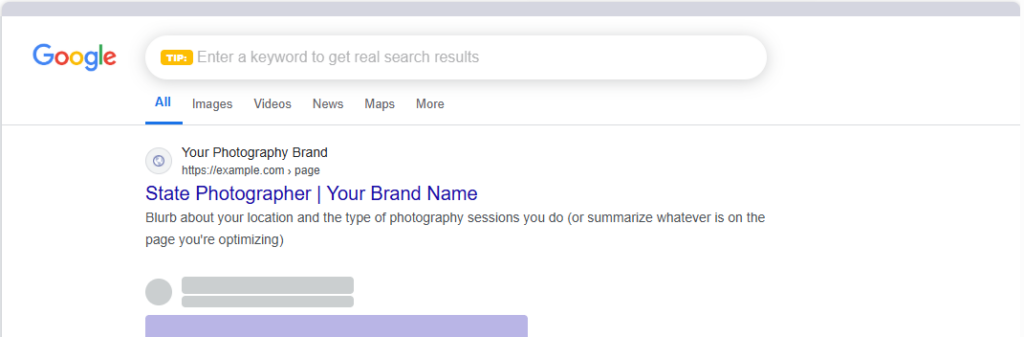
After you pick your keyword, add it into your SEO page title and meta description (it’s what shows up when someone actually searches and convinces Google users to click through to your website). It looks like this:
However, you should never use the same keyword for multiple pages. You’ll end up cannibalizing yourself in search results and hurt vs. help your websites SEO. If you’re having a hard time finding the right keyword, check out Search Party: The Keyword Research Mini-Course!
#3. Optimize Your H1 to Match Your Keyword
Copy is usually a point of contention when it comes to photographers—mostly because so much of what you do is showing, not saying. But copy is still important for telling search engines and website visitors what the page is for, so that search engines can rank them in the right place and users can find exactly where they need to be to learn more about your experience, inquire, and explore (AKA it’s great for conversions).
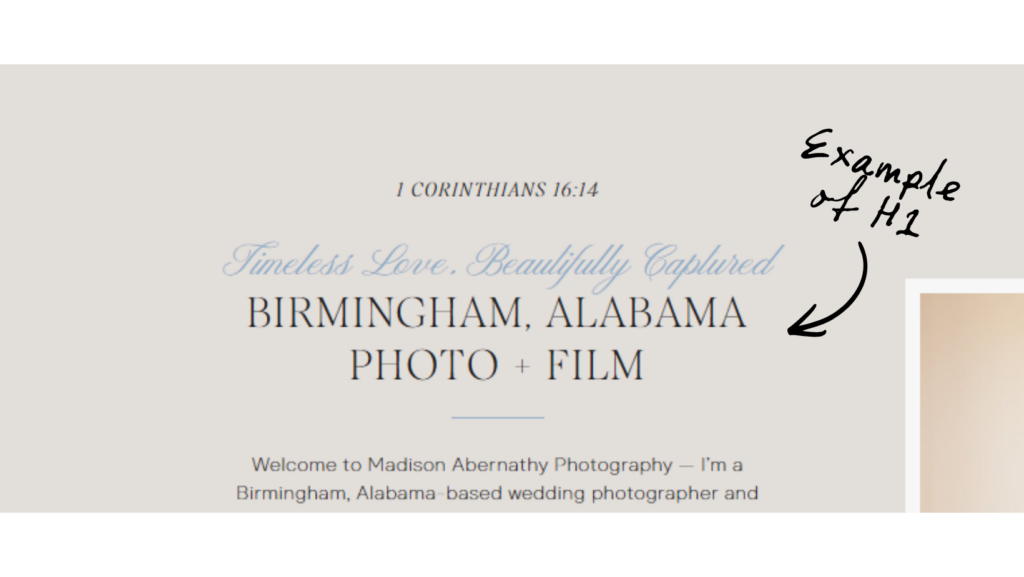
The first place to start is to optimize your H1, or the main piece of copy on your page. H1 isn’t necessarily the size of the text, but the HTML tagging behind the scenes. However, it is usually the first piece of copy on the page. But it’s a statement that summarizes the page (or your business) and includes your keyword. For example:
You should only ever have ONE H1 on each page. If you’re not sure what your current H1 is, or if you have one (or multiple) you can use a free tool like this one to check.
#4. Set-Up Your Google Business Profile (The Right Way)
Step no. 1 → set up a Google Business Profile if you don’t already have one (and if you do, go ahead and bring it into Bing for Business, too).
Next? Optimize it! The same keywords you’re using on your website should be the same keywords you’re using in your GBP. For example, the keywords you’re using on your homepage and about should be the same ones you use in your profile’s description. The keywords you’re using for your services page(s) should be the same one for your services and products.
And yes, I said products. You should take the extra step to create “products” in your Google Business Profile for each tier of your services. If the service is on a landing page separate from your main services page, add that link vs. the main page link!
This strategy essential backs up what you’re doing on your website, allowing them both (your website and your GBP) to support each other on Google for what you do, where you do it, and who you do it for.
#5. Add Local Business Schema
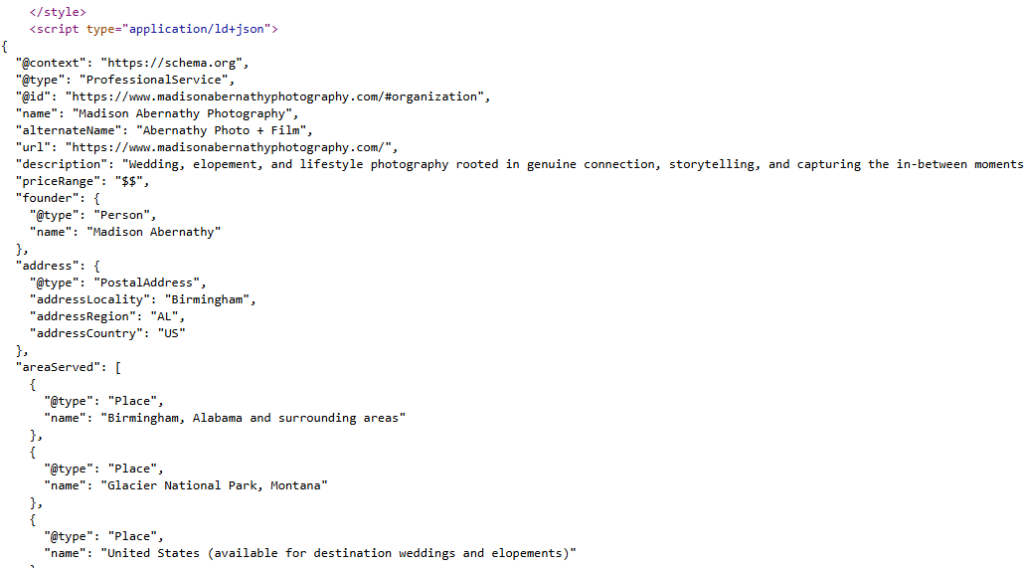
Schema is a type of HTML code you can add to the backend of your website or webpage to help search engines (like Google) and LLMs (like ChatGPT) get more context on the purpose of your page and business. This code plugs into the header of the page and is invisible to eye.
There’s two types of Schema that’s particularly useful for photographers: localbusiness and service. Local business is perfect for an about page or a homepage, where service schema is reserved for landing pages and offers.
Here’s an example of what schema can look like:
You can generate schema using Schema.org, although you’ll need to research how to add the code to your header based on your website builder. You can also use AI to generate your schema code—we even have a prompt for it in our SEO membership, Back Pocket SEO!
If You’re Still Looking to Improve Your SEO, Do This for Your Photography Website:
If you’ve taken the first steps in optimizing for local SEO, then YAY! You’re ready to take it to the next step. I don’t recommend focusing on more things to-do until you’re foundations are in place (it just makes it harder to rank), but these are great ways to continue growing and showing up on search engines:
Start a Blog for Your Portfolio
Blogging is one of my favorite ways to improve your SEO as a photographer! It’s a great way to showcase your portfolio and to share insights into what it’s like to work with you.
I always recommend starting with your portfolio, but also bringing in tips or the things you’d like your clients to know before working with you. This depends on what type of sessions you offer, but as an example, if you’re a wedding photographer, you could write about how long you need to plan for photos on your wedding day—or best poses.
As for your portfolio pieces, you’re using them as ways to reach clients who are looking for your particular style, type of session, or location. So focus on bringing in the details and sharing what it was like for shooting in that area and what a client could expect.
Off-Page SEO for Photographers
Off-page SEO is SEO that helps your website rank in Google searches but doesn’t actually happen on your website. Primarily, off-page SEO relates to how shareable your website and content are. Backlinks are a huge part of your off-page SEO along with social shares. And the best way to improve your off-page SEO is to optimize your content and on-page SEO!
You’ll gather both do-follow and no-follow backlinks naturally by creating content that engages with your readers. As you rank for more keywords and gain more organic traffic, other websites will begin backlinking to your content.
Other ways to create backlinks include guest posting on other’s websites and contributing to reporter queries. Local SEO for photographers can be improved by working with publications that are local to your area – their local SEO can help boost yours! You can learn more about backlinking by reading through our complete guide to SEO backlinks.
How to Get Your Photography Website to Find Your Clients For You

It’s SEO. If you want your website to start working for you and finding clients (without the link-drop), then SEO is your answer.
SEO can be the slower route (taking anywhere from 6-12 months to start bringing in traffic consistently), but it’s one you need—so it’s one to start now. And, if you’re in a high-demand area, you could start seeing results even just after a month. And once you start, the results snowball.
Ready to show up when (and where) your clients are searching?

